~모델링 : https://uj07096.tistory.com/40
[My IT] LSTM 활용 Air Pollution Forecast 데이터셋 예측(1) 데이터셋 소개 ~ 모델링
Air Pollution Forecasting데이터셋 : Kaggle의 Air Pollution Forecasting - LSTM Multivariation Air Pollution Forecasting - LSTM MultivariateLstm multivariate sample dataset for architecture design and orchestrationwww.kaggle.com 목표 : LSTM을 활용
uj07096.tistory.com
4. 하이퍼파라미터 튜닝
수작업으로 하이퍼파라미터 튜닝을 하는 것보다는 베이지안 기법을 쓰는 것이 좋다고 판단하여, 다음과 같은 하이퍼파라미터들에 대하여 튜닝을 진행하였다 :
- hidden_size(LSTM 내부의 hidden size)
- num_layers(LSTM의 레이어 수)
- dropout(드롭아웃 비율)
- weight_decay(가중치 감쇠)
- learning_rate(학습률)
#gpu 설정
device = 'cuda' if torch.cuda.is_available() else 'cpu'
#optuna 활용
def objective(trial) :
#하이퍼파라미터 튜닝 범위 설정
hidden_size = trial.suggest_categorical('hidden_size', [16, 32, 64])
num_layers = trial.suggest_int('num_layers', 3, 5,)
dropout = trial.suggest_float('dropout', 0.1, 0.5)
weight_decay = trial.suggest_float('weight_decay', 1e-5, 1e-2, log = True)
learning_rate = trial.suggest_float('learning_rate', 1e-5, 1e-1, log = True)
#모델 할당
model = LSTMModel(input_size = 10, hidden_size = hidden_size,
num_layers = num_layers, dropout = dropout).to(device)
#optimizer(AdamW) 설정
optimizer = torch.optim.AdamW(model.parameters(), lr = learning_rate, weight_decay = weight_decay)
criterion = nn.MSELoss()
#학습
best_rmse = float('inf') # RMSE는 낮을수록 좋으므로 초기값은 무한대로 설정
epochs = 50
for epoch in range(epochs) :
model.train()
for features, labels in train_loader :
features = features.to(device)
labels = labels.to(device)
#forward
output = model(features)
loss = criterion(output, labels)
#backward
optimizer.zero_grad()
loss.backward()
optimizer.step()
model.eval()
total_loss = 0
total_samples = 0
with torch.no_grad() :
for features, labels in val_loader :
features = features.to(device)
labels = labels.to(device)
output = model(features)
loss = criterion(output, labels)
total_loss += loss.item() * features.size(0)
total_samples += features.size(0)
rmse = np.sqrt(total_loss / total_samples)
if rmse < best_rmse : # RMSE가 더 낮을 때 업데이트
best_rmse = rmse
#수행하던 중 너무 오래걸려서 pruning 추가
trial.report(best_rmse, epoch) # 현재 epoch 결과를 Optuna에 보고
if trial.should_prune():
raise optuna.exceptions.TrialPruned()
return best_rmse
study = optuna.create_study(direction = 'minimize',
pruner = optuna.pruners.MedianPruner(n_startup_trials = 5,
n_warmup_steps = 10))
study.optimize(objective, n_trials = 100)
print(f'Best RMSE:, {study.best_value:.5f}')
print('Best Params:', study.best_params)
튜닝을 진행하는 시간이 너무 오래걸려서 pruning을 추가했다.
5. 모델 학습
- 위에서 튜닝한 하이퍼파라미터들로 구성한 모델을 학습시켰다.
- 학습을 하다보니 과적합이 계속 크게 발생해서 optuna를 활용해서 얻은 하이퍼파라미터 값을 임의로 조정해서 해결하려 하였는데, 해결이 되지 않아서 학습률 스케줄러(ReduceLROnPlateau)와 Early-Stopping 을 적용했다.
#모델 학습 시작

epochs = 200

hidden_size = int(study.best_params['hidden_size'] / 2)
num_layers = study.best_params['num_layers']
dropout = study.best_params['dropout'] + 0.1
wd = study.best_params['weight_decay']
lr = study.best_params['learning_rate']

model = LSTMModel(input_size = 10, hidden_size = hidden_size,
                    num_layers = num_layers, dropout = dropout).to(device)

#optimizer(AdamW) 설정
optimizer = torch.optim.AdamW(model.parameters(), lr = lr, weight_decay = wd)
criterion = nn.MSELoss()

#스케줄러 적용
scheduler = torch.optim.lr_scheduler.ReduceLROnPlateau(optimizer,
                                                       mode = 'min',
                                                       patience = 5,
                                                       factor = 0.5)

#checkpoint
os.makedirs('checkpoints', exist_ok = True)
print('학습 시작')

#history dict
history = {'train_loss' : [], 'val_loss' : [], 'val_rmse' : [], 'val_mae' : []}
best_rmse = float('inf')
best_epoch = 0
stop_patience = 10
stopping_cnt = 0

for epoch in range(epochs) :
  model.train()
  total_loss = 0
  total_samples = 0

  for features, labels in train_loader :
    features = features.to(device)
    labels = labels.to(device)

    #forward
    output = model(features)
    loss = criterion(output, labels)

    #backward
    optimizer.zero_grad()
    loss.backward()
    optimizer.step()

    #train_loss 계산

    total_loss += loss.item() * features.size(0)
    total_samples += features.size(0)

  avg_loss = total_loss / total_samples
  history['train_loss'].append(avg_loss)


  #validation 평가
  model.eval()
  total_v_loss = 0
  total_v_mae = 0
  total_v_samples = 0

  with torch.no_grad() :
    for features, labels in val_loader :
      features = features.to(device)
      labels = labels.to(device)

      output = model(features)
      loss = criterion(output, labels)

      total_v_loss += loss.item() * features.size(0)
      total_v_mae += torch.sum(torch.abs(output - labels)).item()
      total_v_samples += features.size(0)

  avg_v_loss = total_v_loss / total_v_samples
  val_rmse = np.sqrt(total_v_loss / total_v_samples)
  val_mae = total_v_mae / total_v_samples

  history['val_loss'].append(avg_v_loss)
  history['val_rmse'].append(val_rmse)
  history['val_mae'].append(val_mae)

  #스케줄러 업데이트(val_rmse 기준)
  scheduler.step(avg_v_loss)

  if val_rmse < best_rmse :
    best_rmse = val_rmse
    best_epoch = epoch + 1
    stopping_cnt = 0
    torch.save(model.state_dict(), 'checkpoints/best_model.pt')

  else :
    stopping_cnt += 1
    if stopping_cnt >= stop_patience :
      print(f'Early Stop at {epoch + 1} Epoch')
      break

  if (epoch + 1) % 10 == 0:
    print(f'Epoch [{epoch+1}/{epochs}] 완료 , Best Epoch : {best_epoch} , Best RMSE :{best_rmse:.6f}')
RMSE를 기준으로 best model을 찾도록 하였고, best_model에 대해서는 checkpoint라는 디렉토리를 만들어 best_model.pt의 형식으로 저장했다.(state_dict()방식)
손실 시각화
#손실 시각화
epochs_range = range(1, len(history['train_loss']) + 1)

plt.figure(figsize = (12, 12))

#train/validation loss 그래프
ax1 = plt.subplot(2, 1, 1)
ax1.plot(epochs_range, history['train_loss'], label= 'train_loss')
ax1.plot(epochs_range, history['val_loss'], label= 'val_loss')
ax1.set_title('Training vs Val Loss')
ax1.set_xlabel('Epochs')
ax1.set_ylabel('Loss')
ax1.legend()

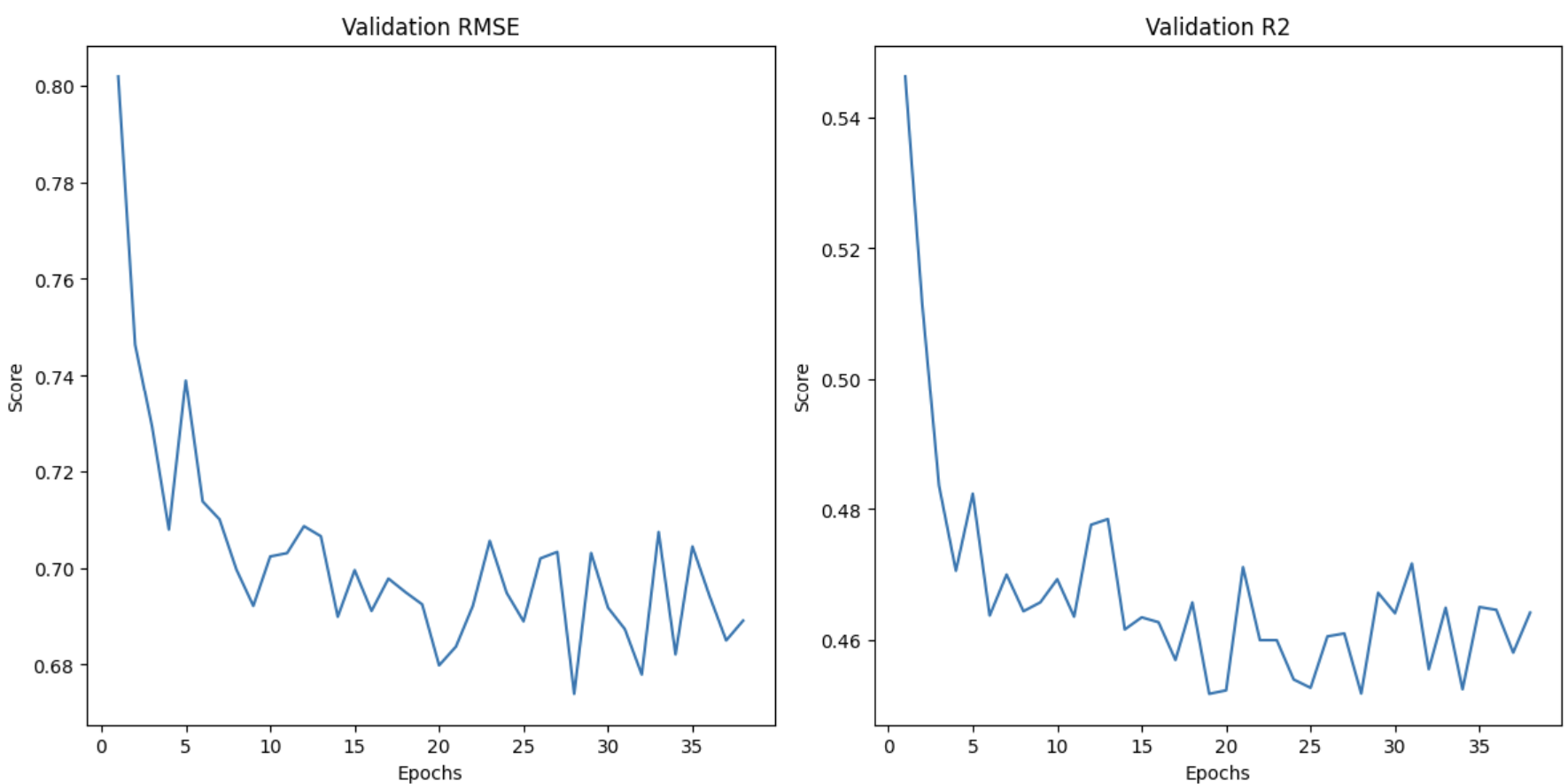
#RMSE 그래프
ax2 = plt.subplot(2, 2, 3)
ax2.plot(epochs_range, history['val_rmse'], label='val_rmse')
ax2.set_title('Validation RMSE')
ax2.set_xlabel('Epochs')
ax2.set_ylabel('Score')

#MAE 그래프
ax3 = plt.subplot(2, 2, 4)
ax3.plot(epochs_range, history['val_mae'], label='val_mae')
ax3.set_title('Validation R2')
ax3.set_xlabel('Epochs')
ax3.set_ylabel('Score')

plt.tight_layout()
plt.show()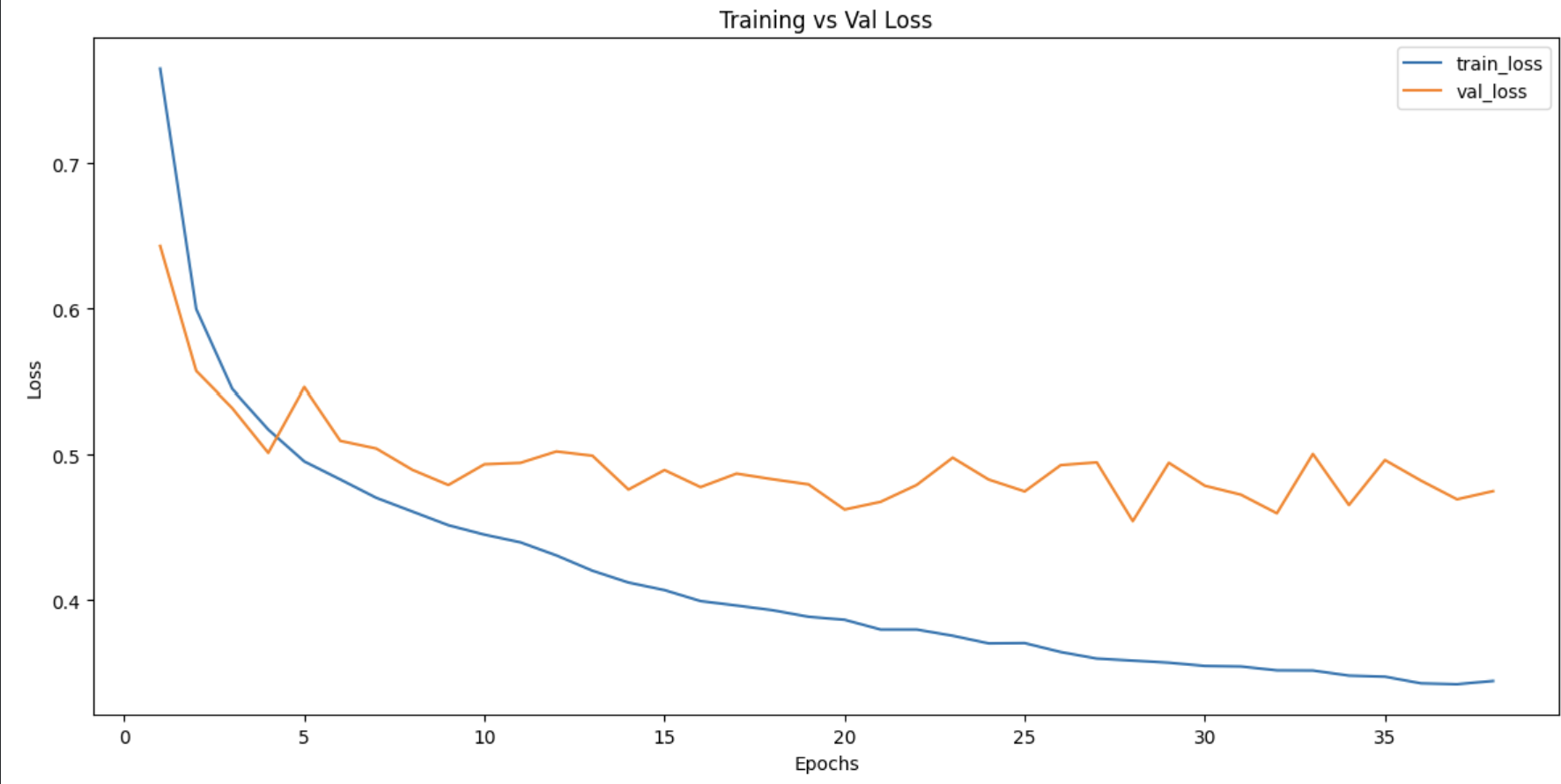
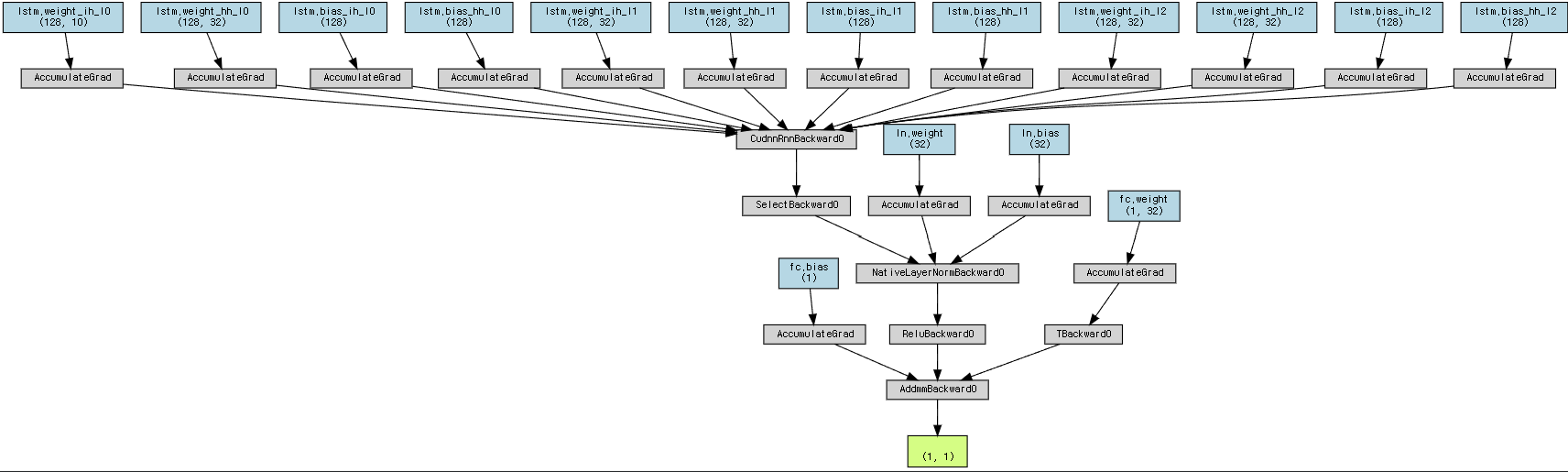
6. Best Model 시각화
가장 낮은 RMSE를 보인 모델에 대해서 시각화를 진행했다.
#모델 로드
best_model_path = 'checkpoints/best_model.pt'
state_dict = torch.load(best_model_path)
model.load_state_dict(state_dict)

model.eval()

#모델 시각화를 위해 더미 입력 생성
x = torch.randn(1, seq_len, 10).to(device)

output = model(x)
dot = make_dot(output, params = dict(model.named_parameters()))
dot.render("lstm_graph", format="png", cleanup=True)
print("lstm_graph 저장 완료")
dot
7. Test 데이터 예측
Best Model을 활용해서 test 데이터셋에 대한 예측을 수행했고, 실제값과 예측값에 대한 그래프를 출력했다.
#test 데이터셋 Load
test_ds = PollutionDataset_Test(test_path, seq_len,
                                seq_x_scaler = train_ds.seq_x_scaler,
                                encoder = train_ds.encoder,
                                y_scaler = train_ds.y_scaler)
test_loader = DataLoader(test_ds, batch_size = 100, shuffle = False)

#test데이터셋 예측 수행
prds = []
targets = []
for i, (features, labels) in enumerate(test_loader):
    with torch.no_grad():
        prd = model(features.to(device))
        prds.append(prd.cpu())
        targets.append(labels)

prds_cat = torch.cat(prds, dim=0)
targets_cat = torch.cat(targets, dim=0)

#그래프에 그리기 위해서 역정규화
prds = train_ds.y_scaler.inverse_transform(prds_cat.numpy())
targets = train_ds.y_scaler.inverse_transform(targets_cat.numpy())


plt.figure(figsize = (20,10))
plt.plot(range(len(targets)), targets, label = 'label')
plt.plot(range(len(prds)), prds, label = 'pred')
plt.show()
예측한 값들을 prds, targets 리스트에 넣은 후, 모두 연결한 후 역정규화를 거쳐 시각화를 진행할 수 있었다.

'My IT > Codes' 카테고리의 다른 글
| [My IT : Codes] X-ray Image Dataset Classification(2) (2차 테스트 ~ Test 데이터 평가) (2) | 2026.04.02 |
|---|---|
| [My IT : Codes] X-ray Image Dataset Classification(1) (시작~ 1차 테스트) (0) | 2026.04.01 |
| [My IT : Codes] LSTM 활용 Air Pollution Forecast 데이터셋 예측(1) 데이터셋 소개 ~ 모델링 (1) | 2026.03.25 |
| [My IT : Codes] AutoEncoder 활용 Denoising (0) | 2026.03.23 |
| [My IT : Codes] Bank-Marketing 데이터 분석(2) (모델 비교 학습 ~ 결론 도출) (1) | 2026.03.09 |