목표 :
● 흉부 X-Ray 사진을 바탕으로 폐렴 환자 구분
● Transfer Learning을 통해 분류 모델 구축
활용 데이터셋
Kaggle의 Chest X-Ray Images (Pneumonia)
Chest X-Ray Images (Pneumonia)
5,863 images, 2 categories
www.kaggle.com
파이프라인 :
- 데이터 분석
- 데이터로더 구축
- 학습/평가함수 구축
- 1차 테스트(사전학습 모델들의 Feature Extraction)
- 2차 테스트(성능지표 상위 2개 모델의 Fine-Tuning)
- 최종 모델 하이퍼파라미터 튜닝
- 모델 학습
- Test 데이터 예측/평가
1. 데이터 EDA
필요 pip / import
!pip install kagglehub!pip install torchmetrics!pip install torchsummary!pip install optuna!pip install grad_camimport kagglehub
import os
import matplotlib.pyplot as plt
import numpy as np
import pandas as pd
import time
from PIL import Image
from pathlib import Path
from torchvision import transforms
import cv2
from torchvision.datasets import ImageFolder
from torch.utils.data import DataLoader, random_split
from torchmetrics import Accuracy, F1Score
import torch.optim as optim
import torch
import torch.nn as nn
from torchsummary import summary
import optuna
from pytorch_grad_cam import LayerCAM
from pytorch_grad_cam.utils.model_targets import ClassifierOutputTarget
from pytorch_grad_cam.utils.image import show_cam_on_image
로컬에 다운로드하여 진행하기 보다는, 캐글에서 직접 코랩 캐시를 사용해 불러오는 방법을 택했다.
# Download latest version
path = kagglehub.dataset_download("paultimothymooney/chest-xray-pneumonia")

print("Path to dataset files:", path)
print("Dataset path:", path)
print("Contents:", os.listdir(path))
chest_xray_path = os.path.join(path, "chest_xray")
print("Chest X-ray folders:", os.listdir(chest_xray_path))
chest-xray 폴더 내의 directory를 직접 접근하기 위해 변수에 path를 할당했다.
train_dir = os.path.join(chest_xray_path, "train")
test_dir  = os.path.join(chest_xray_path, "test")
val_dir   = os.path.join(chest_xray_path, "val")
데이터셋 개수 시각화
폴더별로 몇 장의 이미지가 들어있는지 보기 위해서 DataFrame으로 만들어서 피벗 테이블 형태로 관찰했다.
#폴더별 이미지 개수 dataframe
data = []

#폴더 내 이미지의 개수 읽어옴
for dir in [train_dir, val_dir, test_dir] :
  for label in ['NORMAL', 'PNEUMONIA'] :
    cnt = len(os.listdir(os.path.join(dir, label)))
    data.append([os.path.basename(dir), label, cnt])

#DataFrame, pivot Table 생성
df = pd.DataFrame(data, columns=['dir', 'label', 'count'])
df_pivot = df.pivot(index = 'dir', columns = 'label', values = 'count')
df_pivot = df_pivot.loc[['train', 'val', 'test']]
df_pivot.columns.name = None
df_pivot.index.name = None
df_pivot
-> validation set의 크기가 Normal 8 , Pneumonia 8로 매우 작은 것을 확인
-> test 셋을 분할하여 validation set으로 활용하기로 결정
데이터 시각화
X-Ray이기 때문에 GrayScale로 시각화하였고, Normal 3장, Pneumonia 3장을 뽑아서 보았다.
#이미지 시각화

#3장 가져오기
train_norm_imgs = os.listdir(os.path.join(train_dir, 'NORMAL'))[:3]
train_pneum_imgs = os.listdir(os.path.join(train_dir, 'PNEUMONIA'))[:3]

for i in range(3) :
  norm_path = os.path.join(train_dir, 'NORMAL', train_norm_imgs[i])
  pneum_path = os.path.join(train_dir, 'PNEUMONIA', train_pneum_imgs[i])

  norm_img = Image.open(norm_path)
  pneum_img = Image.open(pneum_path)

  #왼쪽 : Normal 이미지
  plt.subplot(3, 2, 2 * i + 1)
  plt.imshow(norm_img, cmap = 'gray')
  plt.title(f'NORMAL_{i+1}')
  plt.axis('off')

  #오른쪽 : Pneumonia 이미지
  plt.subplot(3, 2, 2 * i + 2)
  plt.imshow(pneum_img, cmap = 'gray')
  plt.title(f'PNEUMONIA_{i+1}')
  plt.axis('off')

이미지 색상정보 / 이미지 크기 확인
이미지 Resize시에 크기를 너무 줄여버리면 성능에 악영향을 끼칠 수 있어 unique 크기를 보았고, 색상정보를 확인했다.
#이미지 색상정보, 이미지 크기 확인
full_image_path = []
for dir in [train_dir, val_dir, test_dir] :
  full_image_path += list(Path(dir).glob('*/*.jpeg'))

# 이미지 크기의 고유값을 보기 위해 set() 이용 (중복 방지)
image_sizes = set()
modes = set()

for image_path in full_image_path:
    with Image.open(image_path) as img:
        # mode : 이미지의 색상정보 (L : 흑백, RGB : 컬러)
        modes.add(img.mode)
        # size : 이미지의 크기
        image_sizes.add(img.size)
min_size = min(image_sizes, key=lambda x: x[0] * x[1])
max_size = max(image_sizes, key=lambda x: x[0] * x[1])
print(f'modes : {modes}')
print(f'image_sizes : {image_sizes}')
print(f'min_size : {min_size}, max_size : {max_size}')
-> RGB, L 의 색상공간들을 가지고 있다 : 하지만 X-Ray 이므로 모두 L로 변환하기로 결정
-> 사전학습 모델도 활용할 계획이기 때문에 224 x 224 로 resize하기로 결정
2. 데이터셋 / 데이터로더 구축
Transforms 구성
학습 데이터셋의 크기가 크지는 않기 때문에, 데이터 증강을 추가하기로 결정했다. 데이터 증강에는 다음과 같은 정책들이 있다.
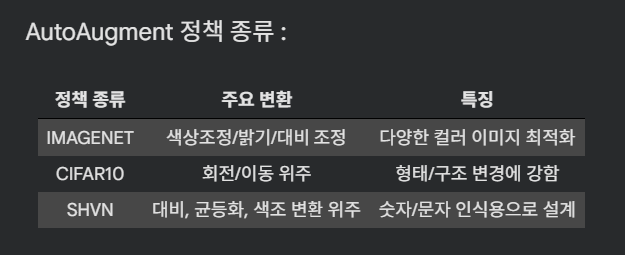
-> AutoAugment를 활용하여 데이터 증강을 진행하기로 결정하였는데, 위의 표에 따라서 CIFAR10 정책으로 진행하기로 결정하였다.
-> 또한 타일별 히스토그램 균일화(CLAHE)를 적용하는 것이 X-Ray 이미지 전처리에서 중요해 적용해주었다.
auto_policy = transforms.AutoAugment(policy=transforms.AutoAugmentPolicy.CIFAR10)

#CLAHE 적용 함수 정의 : transforms에는 clahe 없어서 opencv에서 불러와 tranforms.lambda
clahe = cv2.createCLAHE(clipLimit=2.0, tileGridSize=(8,8))

def apply_clahe(img):
    img = np.array(img.convert('L'))
    img = clahe.apply(img)
    return Image.fromarray(img)
#transform Compose

#train_transform(데이터 증강 o)
train_trasfroms = transforms.Compose([
    transforms.Lambda(lambda img : apply_clahe(img)), #clahe 적용
    transforms.Grayscale(num_output_channels=3),
    transforms.Resize((224, 224)),
    auto_policy,
    transforms.ToTensor(),
    transforms.Normalize(mean=[0.5, 0.5, 0.5],
                     std=[0.5, 0.5, 0.5])
])

val_test_transforms = transforms.Compose([
    transforms.Lambda(lambda img : apply_clahe(img)), #clahe 적용
    transforms.Grayscale(num_output_channels=3),
    transforms.Resize((224, 224)),
    transforms.ToTensor(),
    transforms.Normalize(mean=[0.5, 0.5, 0.5],
                     std=[0.5, 0.5, 0.5])
])
이미지 데이터셋 추출
위에서 validation set 개수가 적어 test 데이터를 random split하여 가져오기로 하여, 진행하였다.
먼저, 폴더 이름으로 라벨링을 진행하기 위해서 ImageFolder로 데이터셋을 읽어왔다.
#Train Data 데이터세트 추출
train_dataset = ImageFolder(train_dir, transform = train_trasfroms)

#val, test 데이터 random split
val_test_dataset = ImageFolder(test_dir, transform = val_test_transforms)
val_size = int(0.5 * len(val_test_dataset))
test_size = len(val_test_dataset) - val_size

val_dataset, test_dataset = random_split(val_test_dataset, [val_size, test_size])
print(f'데이터셋 라벨 : {train_dataset.class_to_idx}')

데이터로더 생성
#데이터로더 생성
train_loader = DataLoader(train_dataset, batch_size = 256,
                          shuffle = True, num_workers = 2,
                          pin_memory = True)
val_loader = DataLoader(val_dataset, batch_size = 32,
                        shuffle= False, num_workers = 2,
                        pin_memory = True)
test_loader = DataLoader(test_dataset, batch_size = 32,
                         shuffle = False, num_workers = 2,
                         pin_memory = True)

#첫 번째 배치의 shape 출력(확인용)
img, label = next(iter(train_loader))
print(img.shape, label.shape)
3. 학습 / 평가 함수 구축
여러 모델들과 여러 fine-tuning 기법을 적용하기 위해서, 반복적으로 호출하게 될 학습/평가 함수를 미리 define 해놓았다.
device = 'cuda' if torch.cuda.is_available() else 'cpu'def train_test(model, model_name, train_loader, val_loader, epochs, lr, wd, device,
unfreeze = None) :
model.to(device)
#옵티마이저 설정(전이학습의 파라미터 관리, 메모리 효율성을 위해 filter 사용)
optimizer = optim.AdamW(filter(lambda p: p.requires_grad, model.parameters()),
lr = lr, weight_decay = wd)
criterion = nn.BCEWithLogitsLoss() #이진분류이기 때문에 BCEWithLogitsLoss() 사용
#성능지표
accuracy = Accuracy(task = 'binary').to(device)
f1 = F1Score(task = 'binary').to(device)
#스케줄러
scheduler = torch.optim.lr_scheduler.ReduceLROnPlateau(optimizer,
mode = 'max',
patience = 5,
factor = 0.5)
#학습 기록
history = {'train_loss':[], 'val_loss':[], 'val_acc':[], 'val_f1':[], 'time' : 0.0}
best_f1 = 0.0
best_epoch = 0
stop_patience = 10
stopping_cnt = 0
#체크포인트
os.makedirs('checkpoints', exist_ok = True)
print('학습 시작')
start_time = time.time()
for epoch in range(epochs) :
#단계적 unfreeze를 진행할 시에 작동되는 조건문(optimizer reset)
if unfreeze is not None :
if unfreeze_layers(model, epoch, unfreeze) :
optimizer = optim.AdamW(filter(lambda p: p.requires_grad, model.parameters()),
lr = lr, weight_decay = wd)
model.train()
t_loss = 0
for idx, (img, label) in enumerate(train_loader) :
img = img.to(device)
#BCEWithLogitsLoss()활용으로 인해 shape 맞추기 위해 unsqueeze
label = label.float().unsqueeze(1).to(device)
#forward
output = model(img)
loss = criterion(output, label)
#backward
optimizer.zero_grad()
loss.backward()
optimizer.step()
t_loss += loss.item()
if (idx+1) % 50 == 0: print('.', end='')
avg_t_loss = t_loss / len(train_loader)
history['train_loss'].append(avg_t_loss)
#Validation
model.eval()
accuracy.reset()
f1.reset()
v_loss = 0
with torch.no_grad() :
for idx, (img, label) in enumerate(val_loader) :
img = img.to(device)
label = label.float().unsqueeze(1).to(device)
output = model(img)
loss = criterion(output, label)
#metrics 계산을 위한 sigmoid
pred = torch.sigmoid(output)
#성능지표 계산
v_loss += loss.item()
accuracy.update(pred, label)
f1.update(pred, label)
acc = accuracy.compute().item()
f1_score = f1.compute().item()
avg_v_loss = v_loss / len(val_loader)
history['val_loss'].append(avg_v_loss)
history['val_acc'].append(acc)
history['val_f1'].append(f1_score)
scheduler.step(f1_score)
if f1_score > best_f1 :
best_f1 = f1_score
best_epoch = epoch + 1
torch.save(model.state_dict(), f'checkpoints/{model_name}_best_model.pt')
print(f"Best 모델 갱신 (Epoch {best_epoch}, F1: {best_f1:.6f})")
stopping_cnt = 0 #stopping count 리셋
else :
stopping_cnt += 1
#Early-Stopping
if stopping_cnt >= stop_patience :
print(f"Early Stopping at {epoch+1} Epoch)")
break
if (epoch + 1) % 10 == 0:
print(f'Epoch [{epoch+1}/{epochs}] 완료 , Best Epoch : {best_epoch} , Best F1 :{best_f1:.6f}')
end_time = time.time()
history['time'] = end_time - start_time
print('학습 종료')
print(f'모델 : {model.__class__.__name__}, 소요시간 : {end_time - start_time: .5f} (sec)')
print(f"최적 F1 에포크: {best_epoch}, 최고 F1 스코어: {best_f1:.6f}")
return history
● Early-Stopping, Scheduler으로 과적합을 방지
● 정상 - 폐렴 사이의 이진 분류이기 때문에 BCEWithLogitsLoss() 사용
● unfreeze 파라미터를 추가해 추후 Fine-Tuning에도 사용할 수 있게 정의
● 모델의 history(성능지표를 모아놓은 값)을 반환하도록 설계
● BCEWithLogitLoss에는 sigmoid처리가 들어있어서 Loss 계산에는 하지 않아도 되지만, metric 계산시에는 확률 계산을 위해서 sigmoid 처리.
● 추후에 전이학습을 위해서 사용되는 파라미터만 업데이트하도록 filter를 사용하여 구축
4. 1차 테스트(Feature Extraction)
- 사전학습된 모델로는 ResNet, EfficientNet, ConvNext, DenseNet모델을 튜닝한 모델들을 불러와 전이학습을 통해 성능지표를 관찰했다.
- Feature Extraction을 총 4개에 모델에 대해서 적용한 후, 가장 좋은 성능지표를 보이는 상위 2개 모델에 대해서 fine_tuning을 진행하기로 하였다.
- 또한 모든 Fine-Tuning에 대해서 첫번째 layer은 너무 큰 초반 저수준 feature를 담당하여서 과적합 위험이 올라가고, 학습 시간이 늘어나는것을 고려해 unfreeze하지 않았다.
※각 모델 소개
- ResNet : Skip connection으로 기울기 소실 문제 완화한 모델
- EfficientNet : 네트워크의 깊이, 너비, 해상도를 균형있게 스케일링해 효율성을 극대화한 모델
- DenseNet : 모든 레이어를 연결해 feature을 최대한 재사용하는 모델
- ConvNeXt : Vision Transformer의 장점을 CNN에 접목하여 성능을 끌어올린 모델
※모델별 장단점

반복 함수 정의
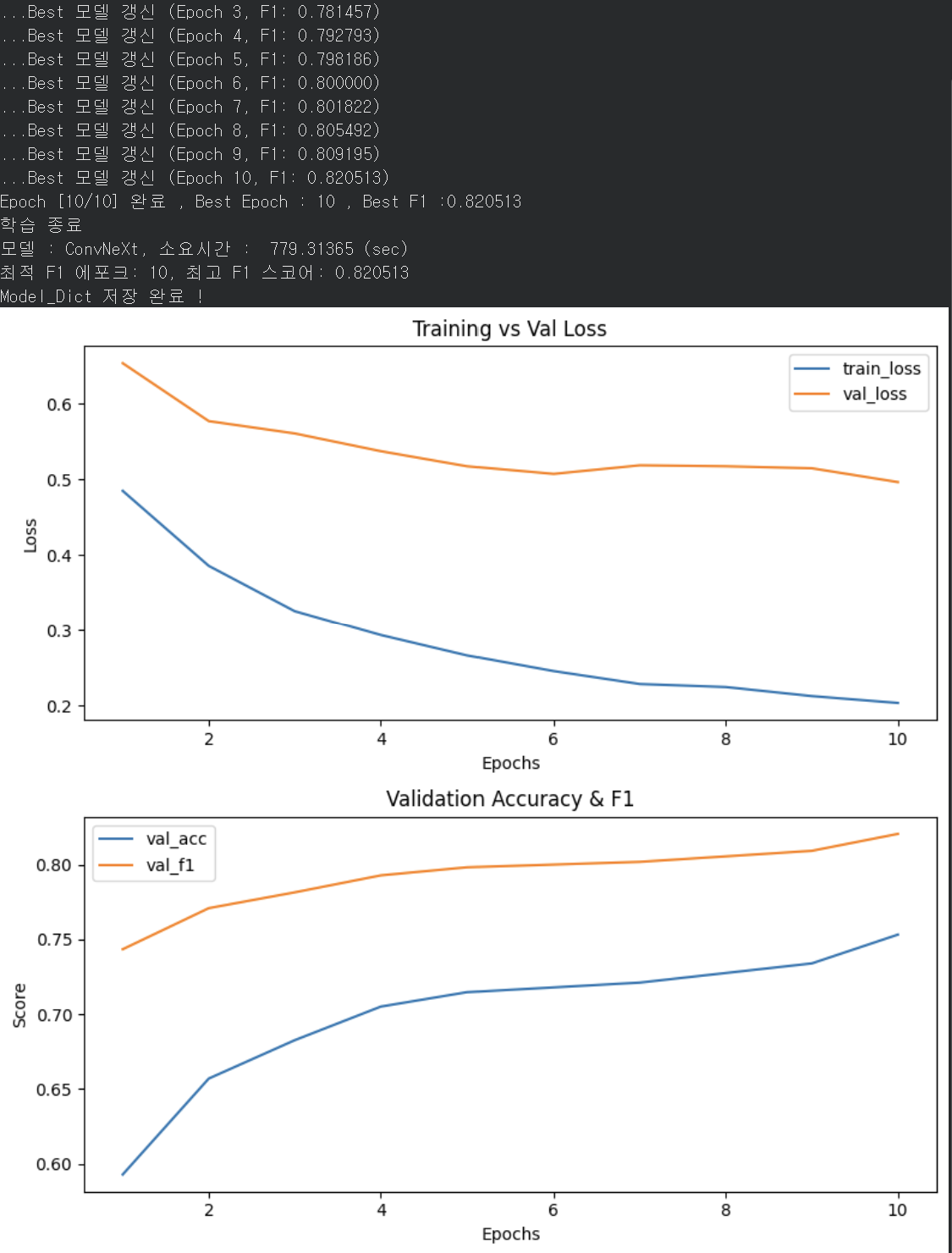
반복적으로 성능지표와 시각화를 진행해야하기 때문에 함수로 정의해 반복작업을 최소화하였다.
#사전학습 모델들 import
from torchvision.models import resnet18, efficientnet_v2_s, convnext_tiny, densenet121
#튜닝한 모델들의 성능지표를 담을 dict 생성
fe_model_dict = {}
model 성능지표 기록 함수 정의
#model_dict에 기록하는 함수 정의
def save_model_dict(model_name, model_dict, history):
  best_epoch = np.argmax(history['val_f1'])

  model_dict[model_name] = {
      "time": history["time"],
      "best_f1": history["val_f1"][best_epoch],
      "best_acc": history["val_acc"][best_epoch],
      "best_loss": history["val_loss"][best_epoch]
  }
train_test에서 반환받은 history를 시각화하는 함수 정의
#history 시각화 함수 정의
def plot_history(history) :
  epochs_range = range(1, len(history['train_loss'])+1)

  plt.figure(figsize=(8, 8))

  # 학습&평가 손실 시각화
  ax1 = plt.subplot(2, 1, 1)
  ax1.plot(epochs_range, history['train_loss'], label= 'train_loss')
  ax1.plot(epochs_range, history['val_loss'], label= 'val_loss')
  ax1.set_title('Training vs Val Loss')
  ax1.set_xlabel('Epochs')
  ax1.set_ylabel('Loss')
  ax1.legend()

  # 정확도&F1 지표 시각화
  ax2 = plt.subplot(2, 1, 2)
  ax2.plot(epochs_range, history['val_acc'], label='val_acc')
  ax2.plot(epochs_range, history['val_f1'], label='val_f1')
  ax2.set_title('Validation Accuracy & F1')
  ax2.set_xlabel('Epochs')
  ax2.set_ylabel('Score')
  ax2.legend()


  plt.legend()
  plt.tight_layout()
  plt.show()
단계적 Unfreeze 함수 정의 : Unfreeze될때마다 unfreeze된 레이어를 print하도록 함수를 정의하였다.
#단계별 unfreeze 함수 정의
def unfreeze_layers(model, epoch, unfreeze, step=3):
    if (epoch + 1) > (len(unfreeze) * step):
        return

    if (epoch + 1) % step == 0:
        layer_idx = (epoch + 1) // step
        target_layer = unfreeze[layer_idx - 1]
        for param in target_layer.parameters():
            param.requires_grad = True
        print(f'\n[Unfreeze] {layer_idx - 1}번째 상위 블록이 해제되었습니다.')

        return True
모델 비교를 할 때에 계속 반복해서 위의 함수들을 불러와야 하기 때문에, 위에서 선언한 함수들을 모두 통합한 함수 compare_models를 가독성을 위해 선언했다.
또한 불러온 사전학습 모델중 ResNet만 분류기의 이름이 model.fc로 설정되어있고, 나머지 모델들은 model.classifier로 저장되어 있어 조건문을 추가하여 진행하였다.
def compare_models(model, model_name, epochs, model_dict, unfreeze = None) :
  # 모델의 모든 가중치를 프리징
  for param in model.parameters():
      param.requires_grad = False

  # classifier 계층만 프리징을 해제
  if model.__class__.__name__ == 'ResNet' :
    for param in model.fc.parameters():
        param.requires_grad = True
  else :
    for param in model.classifier.parameters():
        param.requires_grad = True


  history = train_test(model,
                     model_name,
                    train_loader,
                    val_loader,
                    epochs = epochs,
                    lr = 1e-4,
                     wd = 1e-4,
                    device = 'cuda' if torch.cuda.is_available() else 'cpu',
                    unfreeze = unfreeze
                    )

  save_model_dict(model_name, model_dict, history)
  print('Model_Dict 저장 완료 !')
  plot_history(history)
a ) ResNet - Feature Extraction
모든 사전학습모델은 분류기를 이진 분류기로 바꿔주어 진행하였다.
model = resnet18(weights="IMAGENET1K_V1")
#fe : feature extraction
model_name = 'resnet_fe'

# Before fc레이어 출력
print("Before  : \n")
print(model.fc)

#새로우 fc레이어 할당(이진분류)
new_classifier = nn.Linear(512, 1)
model.fc = new_classifier

#이후 fc레이어 출력
print("After : \n")
print(model.fc)
ResNet 구조 확인
for name, module in model.named_children():
    print(f"{name} : {module.__class__.__name__}")
위에서 한번에 함수들을 묶어놓은 compare_models로 테스트를 진행했다.
compare_models(model, model_name, epochs = 10, model_dict= fe_model_dict)

b) EfficientNet - Feature Extraction
분류기 교체
model = efficientnet_v2_s(weights = 'IMAGENET1K_V1')
model_name = 'efficientnet_fe'

# Before classifier 출력
print("Before  : \n")
print(model.classifier)

new_classifier = torch.nn.Sequential(
    torch.nn.Linear(in_features=1280, out_features=256),
    torch.nn.ReLU(),
    torch.nn.Dropout(p = 0.2),
    torch.nn.Linear(in_features=256, out_features=1)
)

model.classifier = new_classifier

#After Classfier 출력
print("After : \n")
print(model.classifier)

EfficientNet 구조 확인
for name, module in model.features.named_children():
    print(f"{name} : {module.__class__.__name__}")

compare_models(model, model_name, epochs = 10, model_dict= fe_model_dict)

c) DenseNet - Feature Extraction
분류기 교체
model = densenet121(weights = 'IMAGENET1K_V1')
model_name = 'densenet_fe'

print("Before  : \n")
print(model.classifier)

new_classifier = torch.nn.Sequential(
    torch.nn.Linear(in_features=1024, out_features=256),
    torch.nn.ReLU(),
    torch.nn.Dropout(p = 0.2),
    torch.nn.Linear(in_features=256, out_features=1)
)

model.classifier = new_classifier

#After Classfier 출력
print("After : \n")
print(model.classifier)
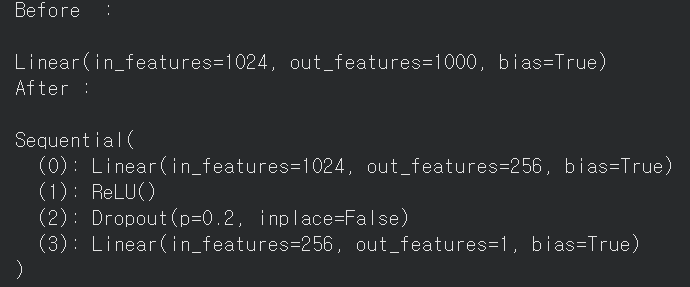
DenseNet 구조 확인
for name, module in model.features.named_children():
    print(f"{name} : {module.__class__.__name__}")

compare_models(model, model_name, epochs = 10, model_dict= fe_model_dict)
d) ConvNeXt - Feature Extraction
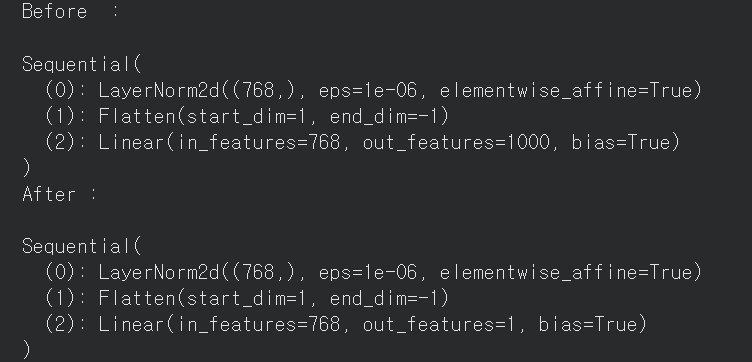
분류기 교체
model = convnext_tiny(weights = 'IMAGENET1K_V1')
model_name = 'convnext_fe'

print("Before  : \n")
print(model.classifier)

model.classifier[-1] = nn.Linear(768, 1)

print("After : \n")
print(model.classifier)
compare_models(model, model_name, epochs = 10, model_dict= fe_model_dict)
1차 테스트 시각화
각각 모델들의 history를 받아와, 먼저 DataFrame으로 만들어, 가장 좋은 지표를 bold처리하여 표 형태로 관찰하였다.
first_test_df = pd.DataFrame(fe_model_dict).T

#가장 좋은 지표를 bold처리
def highlight_best(df):
    styles = pd.DataFrame('', index=df.index, columns=df.columns)

    # 클수록 좋은 컬럼
    for col in ['best_f1', 'best_acc']:
        styles.loc[df[col].idxmax(), col] = 'font-weight: bold'

    # 작을수록 좋은 컬럼
    for col in ['best_loss', 'time']:
        styles.loc[df[col].idxmin(), col] = 'font-weight: bold'

    return styles

first_test_df.style.apply(highlight_best, axis=None)
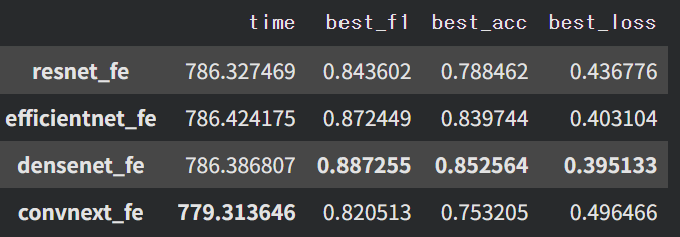
또한 pyplot을 이용해 성능지표들을 시각화하였고, 차이를 더 명확하게 보기위해서 y축에 logscale을 취해주었다.
fig, axes = plt.subplots(2, 2, figsize=(12, 10))
fig.suptitle('Model Comparison', fontsize = 20)

metrics = ['best_f1', 'best_acc', 'best_loss', 'time']
titles = ['Val F1', 'Val Acc', 'Val Loss', 'Time (sec)']
colors = ['steelblue', 'seagreen', 'tomato', 'mediumpurple']
formats = ['.4f', '.4f', '.4f', '.1f']  # time은 소수점 1자리


for ax, metric, title, color, fmt in zip(axes.flatten(), metrics, titles, colors, formats):
    bars = ax.bar(first_test_df.index, first_test_df[metric], color=color, alpha=0.8)
    ax.set_title(title, fontsize=13)
    ax.set_xticks(range(len(first_test_df.index)))
    ax.set_xticklabels(first_test_df.index, rotation=45, ha='right')
    ax.set_yscale('log')  #값 차이를 명확히 보기 위해서 logscale

    for bar, val in zip(bars, first_test_df[metric]):
        ax.text(bar.get_x() + bar.get_width()/2,
                bar.get_height() + 0.001,
                f'{val:{fmt}}',
                ha='center', va='bottom', fontsize=9)

plt.tight_layout()
plt.show()
