시작 ~ 1차 테스트 : X-ray Image Dataset Classification(1)
[My IT] X-ray Image Dataset Classification(1) (시작~ 1차 테스트)
목표 :● 흉부 X-Ray 사진을 바탕으로 폐렴 환자 구분● Transfer Learning을 통해 분류 모델 구축 활용 데이터셋Kaggle의 Chest X-Ray Images (Pneumonia) Chest X-Ray Images (Pneumonia)5,863 images, 2 categorieswww.kaggle.com 파
uj07096.tistory.com
5. 2차 테스트(Fine-Tuning)
2차 테스트는 1차 테스트에서 합격한 모델들로 Feature Extraction부터, 분류기에 가까운 계층부터 순차적으로 unfreeze하며 Fine-Tuning 미세조정을 시작했다.
2차 테스트 성능지표를 담을 dict 생성
FT_model_dict = {}
a) EfficientNet - Fine-Tuning
분류기 교체
model = efficientnet_v2_s(weights = 'IMAGENET1K_V1')
model_name = 'efficientnet_fine_tuning'

# Before classifier 출력
print("Before  : \n")
print(model.classifier)

new_classifier = torch.nn.Sequential(
    torch.nn.Linear(in_features=1280, out_features=256),
    torch.nn.ReLU(),
    torch.nn.Dropout(p = 0.2),
    torch.nn.Linear(in_features=256, out_features=1)
)

model.classifier = new_classifier

print("After : \n")
print(model.classifier)

#unfreeze할 레이어 설정
unfreeze = [
  model.features[-1],
  model.features[-2],
  model.features[-3],
]
compare_models(model, model_name, epochs = 15, model_dict= FT_model_dict, unfreeze = unfreeze)

b) DenseNet - Fine-Tuning
분류기 교체
model = densenet121(weights = 'IMAGENET1K_V1')
model_name = 'densenet_fine_tuning'

print("Before  : \n")
print(model.classifier)

new_classifier = torch.nn.Sequential(
    torch.nn.Linear(in_features=1024, out_features=256),
    torch.nn.ReLU(),
    torch.nn.Dropout(p = 0.2),
    torch.nn.Linear(in_features=256, out_features=1)
)

model.classifier = new_classifier

#After Classfier 출력
print("After : \n")
print(model.classifier)

unfreeze = [
    model.features.denseblock4,
    model.features.denseblock3,
    model.features.denseblock2
]

compare_models(model, model_name, epochs = 15, model_dict= FT_model_dict, unfreeze = unfreeze)

2차 테스트 시각화
1차 테스트와 같은 방법으로 DataFrame 형태로 표를 보았고, 시각화를 통해 성능지표를 관찰했다.
#표(DataFrame) 시각화
second_test_df = pd.DataFrame(FT_model_dict).T

#first test에서 사용했던 함수 사용
second_test_df.style.apply(highlight_best, axis=None)
# 막대그래프 시각화
fig, axes = plt.subplots(2, 2, figsize=(12, 10))
fig.suptitle('Model Comparison', fontsize = 20)

metrics = ['best_f1', 'best_acc', 'best_loss', 'time']
titles = ['Val F1', 'Val Acc', 'Val Loss', 'Time (sec)']
colors = ['steelblue', 'seagreen', 'tomato', 'mediumpurple']
formats = ['.4f', '.4f', '.4f', '.1f']  # time은 소수점 1자리


for ax, metric, title, color, fmt in zip(axes.flatten(), metrics, titles, colors, formats):
    bars = ax.bar(second_test_df.index, second_test_df[metric], color=color, alpha=0.8)
    ax.set_title(title, fontsize=13)
    ax.set_xticks(range(len(second_test_df.index)))
    ax.set_xticklabels(second_test_df.index, rotation=45, ha='right')
    ax.set_yscale('log')  #값 차이를 명확히 보기 위해서 logscale


    for bar, val in zip(bars, second_test_df[metric]):
        ax.text(bar.get_x() + bar.get_width()/2,
                bar.get_height() + 0.001,
                f'{val:{fmt}}',
                ha='center', va='bottom', fontsize=9)

plt.tight_layout()
plt.show()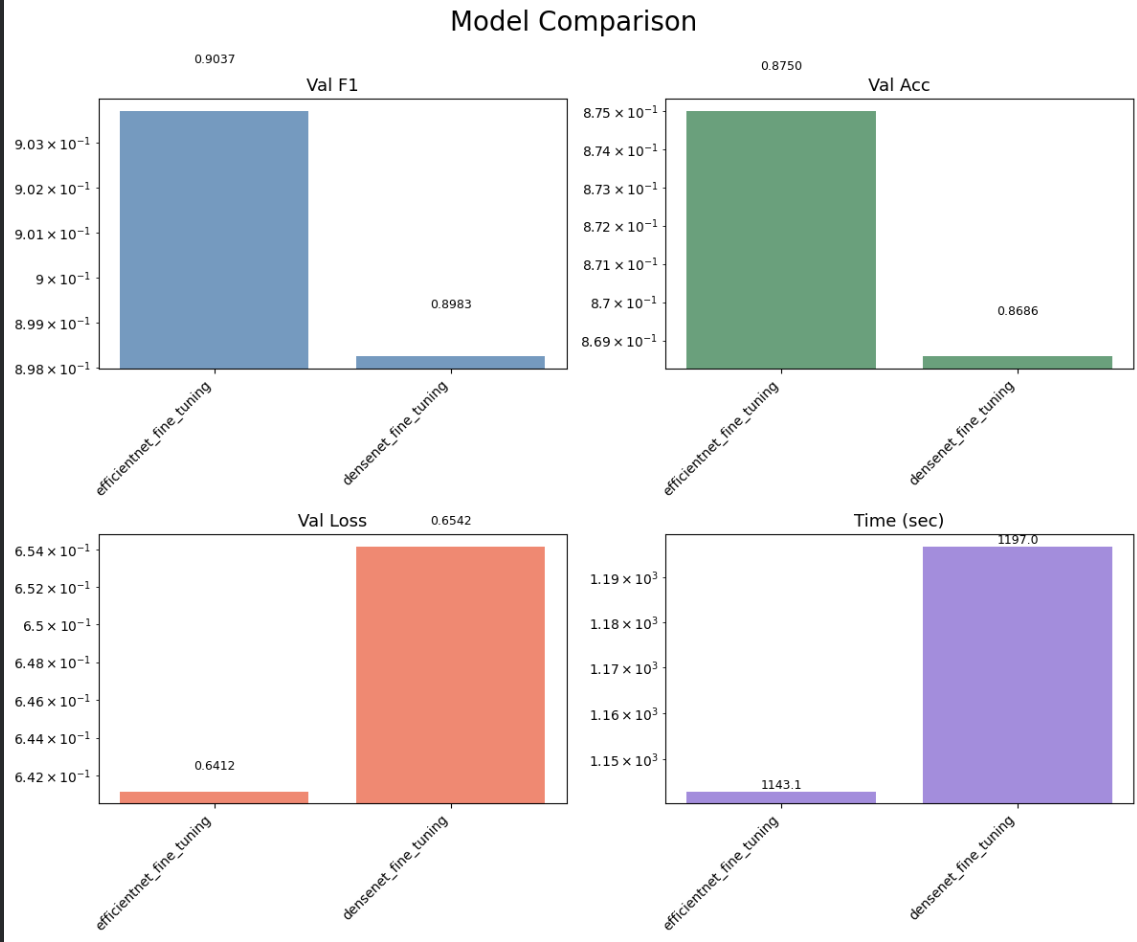
Fine-Tuning에 걸렸던 시간, 성능지표면에서 EfficientNet이 더 좋은 지표를 보였기 때문에 최종 모델은 Fine-Tuning된 EfficientNet으로 결정하게 되었다.
6. 하이퍼파라미터 튜닝
2차 테스트에서 더 나은 성능지표를 보인 모델인 EfficientNet을 가져와 learning_rate, weight_decay에 대해서 하이퍼파라미터 튜닝을 진행했다.
하이퍼파라미터 튜닝에 대해서는 분류기만 unfreeze하고 진행했다.
def objective(trial):
    weight_decay = trial.suggest_float('weight_decay', 1e-5, 1e-2, log=True)
    learning_rate = trial.suggest_float('learning_rate', 1e-5, 1e-1, log=True)


	#fine_tuning된 best efficientnet 모델 로드
    model = efficientnet_v2_s(weights=None)
    new_classifier = torch.nn.Sequential(
    torch.nn.Linear(in_features=1280, out_features=256),
    torch.nn.ReLU(),
    torch.nn.Dropout(p = 0.2),
    torch.nn.Linear(in_features=256, out_features=1)
    )

    model.classifier = new_classifier
    model.load_state_dict(torch.load('checkpoints/efficientnet_fine_tuning_best_model.pt'))
    model.to(device)

    optimizer = torch.optim.AdamW(model.parameters(), lr=learning_rate, weight_decay=weight_decay)
    criterion = nn.BCEWithLogitsLoss()
    f1 = F1Score(task='binary').to(device)

    best_f1 = 0.0
    epochs = 20

    try:
        for epoch in range(epochs):
            model.train()
            for idx, (img, label) in enumerate(train_loader):
                img = img.to(device)
                label = label.float().unsqueeze(1).to(device)

                output = model(img)
                loss = criterion(output, label)

                optimizer.zero_grad()
                loss.backward()
                optimizer.step()

            model.eval()
            f1.reset()
            with torch.no_grad():
                for idx, (img, label) in enumerate(val_loader):
                    img = img.to(device)
                    label = label.float().unsqueeze(1).to(device)

                    output = model(img)
                    pred = torch.sigmoid(output)
                    f1.update(pred, label)

            f1_score = f1.compute().item()
            if (epoch + 1) % 5 == 0:
                print('.', end='')

            if f1_score > best_f1:
                best_f1 = f1_score

            trial.report(f1_score, epoch)
            if trial.should_prune():
                raise optuna.exceptions.TrialPruned()
	#trial마다 캐시 삭제(메모리 효율성 위함)
    finally:
        del model, optimizer, criterion, f1
        torch.cuda.empty_cache()

    return best_f1


study = optuna.create_study(direction = 'maximize',
                            pruner = optuna.pruners.MedianPruner(n_startup_trials = 5,
                                                                 n_warmup_steps = 10))
study.optimize(objective, n_trials = 50)

print(f'Best Score : {study.best_value}')
print(f'Best Params : {study.best_params}')
7. 모델 학습
optuna로 도출한 학습률, 가중치 감쇠값을 가지고 충분한 epochs로 데이터셋에 대해 best model을 불러와 모델을 학습시켰다.
wd = study.best_params['weight_decay']
lr = study.best_params['learning_rate']
#early-Stopping 있기 때문에 Epochs 넉넉하게 잡음
epochs = 500

model = efficientnet_v2_s(weights = None)
model_name = 'final_model'

new_classifier = torch.nn.Sequential(
    torch.nn.Linear(in_features=1280, out_features=256),
    torch.nn.ReLU(),
    torch.nn.Dropout(p = 0.2),
    torch.nn.Linear(in_features=256, out_features=1)
)
model.classifier = new_classifier
model.load_state_dict(torch.load('checkpoints/efficientnet_fine_tuning_best_model.pt'))
model.to(device)

final_train_history = train_test(model, model_name, train_loader, val_loader,
           epochs = epochs, lr = lr, wd = wd, device = device)
plot_history(final_train_history)

8. Test 데이터 평가
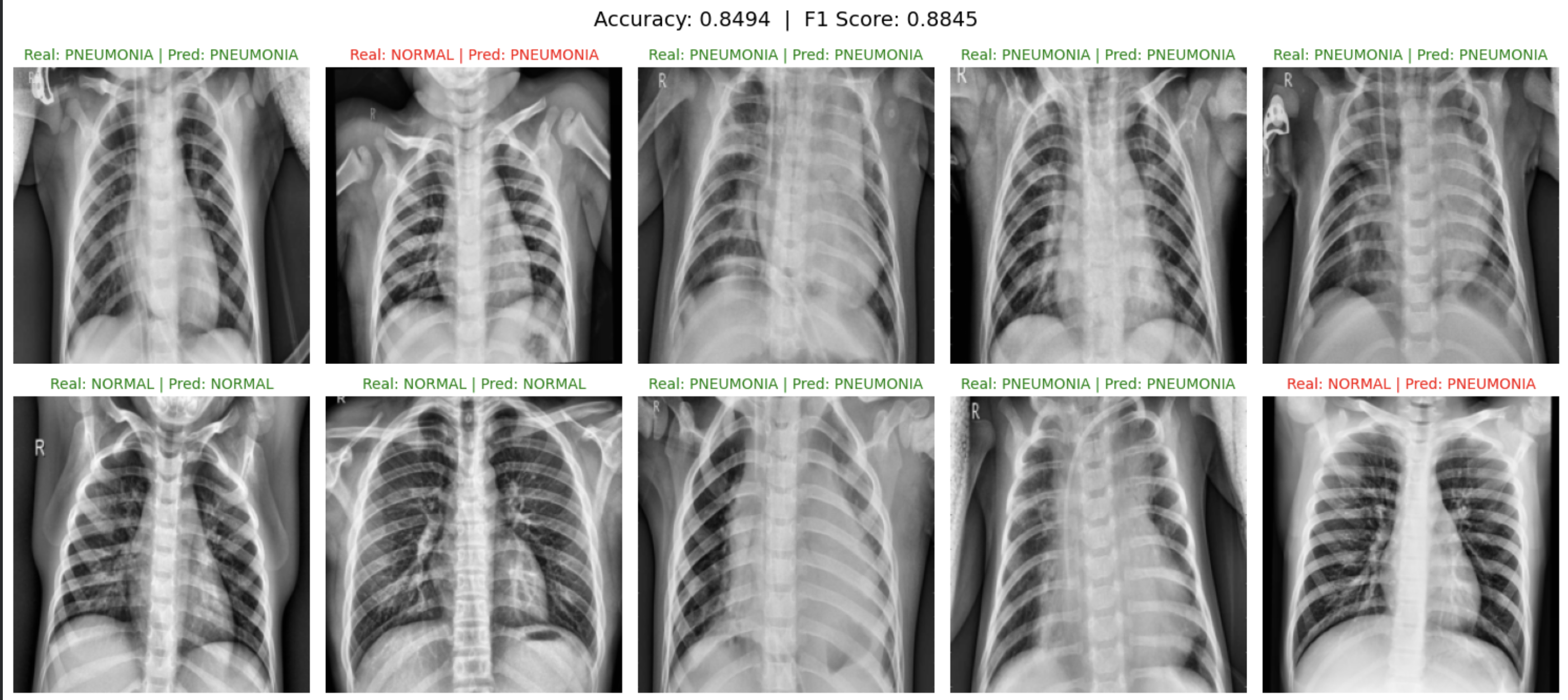
먼저, 테스트 데이터에 대해 올바르게 예측이 이루어졌는지 보기 위해 테스트 데이터셋에서 10장을 가져와, 예측과 실제 라벨값이 다르면 red, 같으면 green으로 이미지별로 제목을 띄워놓아 보여지게 하였다. 또한 제목으로 정확도와 F1 Score을 볼 수 있게 시각화했다.
model = efficientnet_b1(weights = None)
model.classifier = new_classifier

model.load_state_dict(torch.load('checkpoints/final_model_best_model.pt'))
model.to(device)

accuracy = Accuracy(task='binary').to(device)
f1 = F1Score(task='binary').to(device)

img_list, label_list, pred_list = [], [], []
class_names = {0: 'NORMAL', 1: 'PNEUMONIA'}

model.eval()
with torch.no_grad() :
  for idx, (img, label) in enumerate(test_loader):
    img = img.to(device)
    label = label.float().unsqueeze(1).to(device)

    output = model(img)
    pred = torch.sigmoid(output)

    accuracy.update(pred, label)
    f1.update(pred, label)

    img_list.append(img.cpu())
    label_list.append(label.cpu())
    pred_list.append(pred.cpu())

acc = accuracy.compute().item()
f1_score = f1.compute().item()

images = torch.cat(img_list)
labels = torch.cat(label_list)
preds = torch.cat(pred_list)

fig, axes = plt.subplots(2, 5, figsize=(15, 7))
fig.suptitle(f'Accuracy: {acc:.4f}  |  F1 Score: {f1_score:.4f}', fontsize=14)

for i, ax in enumerate(axes.flatten()):
  #Pytorch 형식 : (C, H, W), Matplotlib 형식 : (H, W, C)
  img = images[i].permute(1, 2, 0).numpy()
  img = img * 0.5 + 0.5 #역정규화

  true_label = int(labels[i].item())
  #sigmoid 출력값이 0.5 이상이면 True(PNEUMONIA)
  pred_label = int(preds[i].item() > 0.5)

  ax.imshow(img)
  ax.axis('off')
  #정답을 맞췄으면 green
  color = 'green' if true_label == pred_label else 'red'
  ax.set_title(f'Real: {class_names[true_label]} | Pred: {class_names[pred_label]}',
                color=color, fontsize=10)

plt.tight_layout()
plt.show()
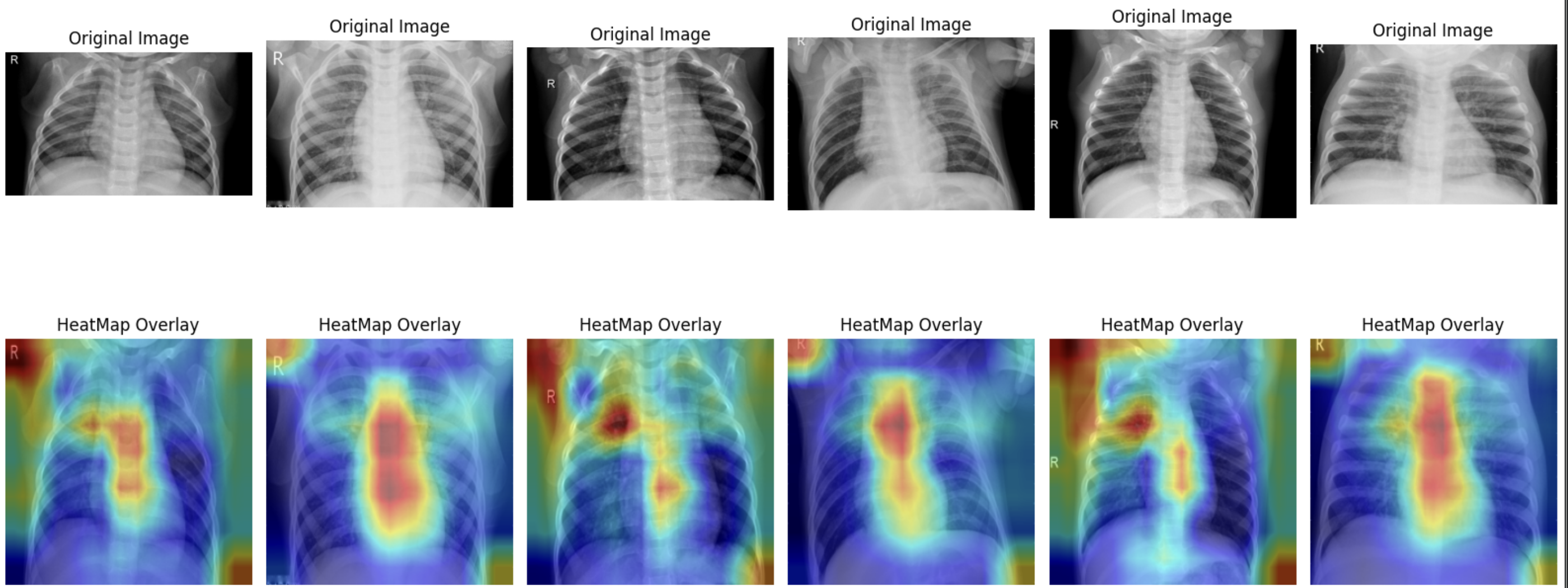
이후 Layer-Cam을 활용하여 모델이 이미지에 어떤 부분에 집중을 하여 예측하였는지 살펴보았다.
model = efficientnet_b1(weights = None)
model.classifier = new_classifier

model.load_state_dict(torch.load('checkpoints/final_model_best_model.pt'))
model.to(device)

accuracy = Accuracy(task='binary').to(device)
f1 = F1Score(task='binary').to(device)

img_list, label_list, pred_list = [], [], []
class_names = {0: 'NORMAL', 1: 'PNEUMONIA'}

model.eval()
with torch.no_grad() :
  for idx, (img, label) in enumerate(test_loader):
    img = img.to(device)
    label = label.float().unsqueeze(1).to(device)

    output = model(img)
    pred = torch.sigmoid(output)

    accuracy.update(pred, label)
    f1.update(pred, label)

    img_list.append(img.cpu())
    label_list.append(label.cpu())
    pred_list.append(pred.cpu())

acc = accuracy.compute().item()
f1_score = f1.compute().item()

images = torch.cat(img_list)
labels = torch.cat(label_list)
preds = torch.cat(pred_list)

fig, axes = plt.subplots(2, 5, figsize=(15, 7))
fig.suptitle(f'Accuracy: {acc:.4f}  |  F1 Score: {f1_score:.4f}', fontsize=14)

for i, ax in enumerate(axes.flatten()):
  #Pytorch 형식 : (C, H, W), Matplotlib 형식 : (H, W, C)
  img = images[i].permute(1, 2, 0).numpy()
  img = img * 0.5 + 0.5 #역정규화

  true_label = int(labels[i].item())
  #sigmoid 출력값이 0.5 이상이면 True(PNEUMONIA)
  pred_label = int(preds[i].item() > 0.5)

  ax.imshow(img)
  ax.axis('off')
  #정답을 맞췄으면 green
  color = 'green' if true_label == pred_label else 'red'
  ax.set_title(f'Real: {class_names[true_label]} | Pred: {class_names[pred_label]}',
                color=color, fontsize=10)

plt.tight_layout()
plt.show()