목표
: U-Net을 이용해 축구 경기 영상 내의 다양한 객체(예: 골대, 심판, 선수, 관중 등)를 픽셀 단위로 분할하는 Semantic Segmentation 작업을 수행
활용 데이터셋
Kaggle의 FootBall(Sementic Segmentation) 데이터셋
Football (Semantic Segmentation)
100 frames of pixel-perfect semantic segmentation with 11 classes.
www.kaggle.com
파이프라인
1. 데이터 불러오기
2. 데이터 EDA
3. 데이터셋 생성
4. 모델링
5. 모델 하이퍼파라미터 튜닝
6. 모델 학습 / 시각화
7. 성능지표 비교 / 결론
1. 데이터 불러오기
Imports
!pip install optuna!pip install torchmetrics!pip install torchinfo
import zipfile
import os
from torchvision.transforms import v2
import matplotlib.pyplot as plt
import numpy as np
from PIL import Image
import torch
import json
from pycocotools.coco import COCO
import matplotlib.patches as mpatches
from torch.utils.data import Dataset, DataLoader
from torchvision import transforms
from torchvision.transforms import v2
from pathlib import Path
from sklearn.model_selection import train_test_split
import torch.nn as nn
import torch.nn.functional as F
from torchvision.models import resnet34, ResNet34_Weights
import pandas as pd
from torchmetrics.segmentation import DiceScore, MeanIoU
import optuna
import time
from torchinfo import summary
데이터 불러오기
#디바이스 설정
device = torch.device("cuda" if torch.cuda.is_available() else "cpu")
print(device)
#google drive import
from google.colab import drive
drive.mount('/content/drive')
# 드라이브 마운트경우 드라이브 경로로
zip_filename = '/content/drive/MyDrive/datasets/Football.zip'

# 압축 해제는 현재 경로로 설정
extract_folder = './football'

os.makedirs(extract_folder, exist_ok=True)

with zipfile.ZipFile(zip_filename, 'r') as zipf:
    zipf.extractall(extract_folder)
데이터 개수 검사, 파일 경로 저장
#경로 설정
data_dir = '/content/football'
image_dir = os.path.join(data_dir, 'images')
full_file_paths = sorted(os.listdir(image_dir))
#images내 파일 경로들 list 생성
fuse_file_paths = []
save_file_paths = []
image_file_paths = []
for file in full_file_paths:
  full_path = os.path.join(image_dir, file)
  if 'fuse' in file :
    fuse_file_paths.append(full_path)
  elif 'save' in file :
    save_file_paths.append(full_path)
  else :
    image_file_paths.append(full_path)

#모든 길이가 같은지 검사
assert len(fuse_file_paths) == len(save_file_paths) == len(image_file_paths)

print(f'파일 경로 Save 완료. 데이터 개수 : {len(image_file_paths)}')
print(save_file_paths[0])
2. 데이터 EDA
2-1. 이미지 확인
먼저, 원본 jpg 이미지와 fuse.png, save.png의 이미지가 어떤 방식으로 들어있는지 알아보기 위해서 시각화를 진행했다.
#데이터 시각화

fig, axes = plt.subplots(4, 3, figsize=(12, 16))
cols = ['Image', 'Fuse', 'Save']

for i in range(4):
    imgs = [
        Image.open(image_file_paths[i]),
        Image.open(fuse_file_paths[i]),
        Image.open(save_file_paths[i])
    ]

    for j, (img, col) in enumerate(zip(imgs, cols)):
        axes[i][j].imshow(img, cmap='gray' if j == 2 else None)
        axes[i][j].set_title(col if i == 0 else "")
        axes[i][j].axis('off')

plt.tight_layout()
plt.show()
2-2. 이미지 색상공간, 크기 확인
이미지의 고유 색상공간이 어떤식으로 저장되어있는지 확인했다.
-> 데이터셋 전처리시에 색상공간 변환 필요여부 판단
original_image_modes = set(Image.open(p).mode for p in image_file_paths)
fuse_image_modes = set(Image.open(p).mode for p in fuse_file_paths)
save_image_modes = set(Image.open(p).mode for p in save_file_paths)

print(f'원본 이미지 색상공간 : {original_image_modes}')
print(f'fuse 이미지 색상공간 : {fuse_image_modes}')
print(f'save 이미지 색상공간 : {save_image_modes}')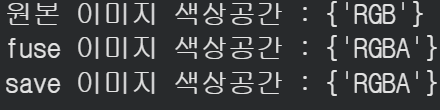
원본 이미지의 경우에는 RGB, fuse 이미지와 save이미지에 대해서는 RGBA 공간으로 저장되어있는 것을 확인했다.
이번엔 이미지의 unique 크기들을 확인했다.
-> 전처리시에 어느정도로 crop할지 판단
#이미지들의 고유 크기 확인
original_image_size = set(Image.open(p).size for p in image_file_paths)
fuse_image_size = set(Image.open(p).size for p in fuse_file_paths)
save_image_size = set(Image.open(p).size for p in save_file_paths)

print(f'원본 이미지 색상공간 : {original_image_size}')
print(f'fuse 이미지 색상공간 : {fuse_image_size}')
print(f'save 이미지 색상공간 : {save_image_size}')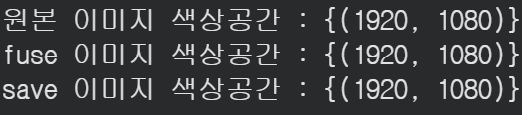
모든 이미지가 공통적으로 (1920, 1080)의 크기를 가지고 있는 것을 확인할 수 있었다.
fuse이미지와 save이미지의 고유 색상값을 매핑하기 위해서 함수를 선언하여 가져왔다.
#unique color값 가져오는 함수 정의
def unique_colors(path) :
  color_set = set()

  for file in path :
    mask = np.array(Image.open(file).convert('RGB'))
    mask_pixels = mask.reshape(-1, 3)
    colors = np.unique(mask_pixels, axis=0)
    color_set.update(map(tuple, colors))
  return list(color_set)
# unique 색상 수 비교
fuse_unique = unique_colors(fuse_file_paths[:10])
save_unique = unique_colors(save_file_paths[:10])

print(f"fuse unique 색상 수: {len(fuse_unique)}")
print(f"save unique 색상 수: {len(save_unique)}")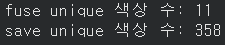
● fuse_unique에서는 11개의 unique한 색상값이 추출되었고, 라벨 데이터로 쓰기 알맞아 보인다.
● save_uniue는 358개의 색상값이 나온 것으로 보아, 노이즈가 많다고 판단해 라벨데이터로 쓰기 어렵다고 판단했고, fuse.png 파일을 라벨 데이터로 쓰기로 판단했다.
2-3. json 파일 확인
#json 파일 open 후 key 확인
with open('/content/football/COCO_Football Pixel.json', 'r') as json_file:
    data = json.load(json_file)

print(data.keys())  # 어떤 키들이 있는지 확인
- 카테고리에 어떤 값들이 있는지 관찰했다.
print(f'카테고리 개수 : {len(data["categories"])}')
print('카테고리 목록')
for cate in data['categories'] :
  print(cate)
카테고리가 id값과 클래스 이름, color이 깔끔하게 매핑되어있는걸 확인할 수 있었다. 추후에 라벨 데이터, 시각화 에 활용하기 위해서 미리 매핑을 진행했다.
- 클래스 id : 클래스 인덱스
- 클래스 인덱스 : 클래스 이름
- 클래스 색상 : 인덱스
- 클래스 인덱스 : 클래스 색상(역방향)
#클래스 id : 클래스 인덱스
class_id_to_idx = {cate['id']: idx for idx, cate in enumerate(data['categories'])}

#클래스 인덱스 : 클래스 이름
class_idx_to_name = {idx: cate['name'] for idx, cate in enumerate(data['categories'])}

#클래스 색상 : 클래스 인덱스
class_color_to_idx = {tuple(cat['color']): idx for idx, cat in enumerate(data['categories'])}

#클래스 인덱스 : 클래스 색상(역방향)

class_id_to_color = {cate['id']: tuple(cate['color']) for cate in data['categories']}

#클래스 이름과 인덱스 확인
print(class_idx_to_name)

3. 데이터셋 생성
3-1. fuse color 재매핑
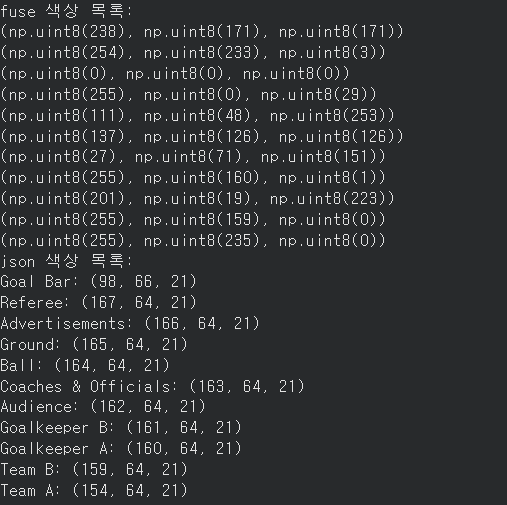
json파일에 매핑되어있는 카테고리의 색상값과, fuse.png에 있는 카테고리의 색상 매핑값이 다르지만, fuse에 있는 이미지값의 개수와 json파일의 이미지값의 개수가 같으므로, segmenation을 잘 진행하는 것이 목적이므로 굳이 순서와 관계없이 인덱스 순서로 매핑을 진행했다.
#fuse color, json index/color 살펴보기
print("fuse 색상 목록:")
for color in fuse_unique:
    print(color)

print("json 색상 목록:")
for cate in data['categories']:
    print(f"{cate['name']}: {tuple(cate['color'])}")
#fuse color idx로 매핑
fuse_color_to_idx = {tuple(int(c) for c in color) : idx for idx, color in enumerate(fuse_unique)}
print(fuse_color_to_idx)
위처럼, fuse.png의 색상값에 클래스 인덱스가 매핑되어있는 것을 볼 수 있다.
3-2. color -> index, index -> color 함수 생성
데이터셋 생성시에 fuse color -> index, 추후 시각화시에 index -> fuse color를 동작하는 함수가 계속 필요할 것 같아서 미리 정의해놓았다.
#Fuse Color -> Index(전처리용)
def color_to_idx(mask_img) :
  #fuse 이미지 -> 클래스 인덱스로 전환
  mask_np = mask_img.permute(1, 2, 0).cpu().numpy().astype(np.uint8)
  #배경 이미지 res_mask 정의
  res_mask = np.zeros(mask_np.shape[:2], dtype = np.int64)

  #boolean indexing
  for color, class_idx in fuse_color_to_idx.items() :
    #모든 color을 반복하며 color과 일치하는 class_idx로 할당
    match = np.all(mask_np == color, axis=2)
    res_mask[match] = class_idx

  return res_mask
#Index -> fuse Color(시각화용)
def index_to_color(mask_idx):
    mask_np = np.array(mask_idx)
    res_mask = np.zeros((*mask_np.shape, 3), dtype=np.uint8)


    for color, class_idx in fuse_color_to_idx.items():
        #인덱스 마스크에서 class_idx와 일치하는 픽셀 위치 찾기
        match = mask_np == class_idx
        #True 인 위치에 색상 넣기
        res_mask[match] = color
    return res_mask
3-3. 데이터셋 생성
원본 이미지는 색상공간이 모두 RGB이기 떄문에 convert하지 않고, fuse 이미지의 경우에는 RGB로 변환해주었다.
#데이터셋 생성
class FootballDataset(Dataset) :
  def __init__(self, image_dir, mask_dir, transform = None) :
    self.images = image_dir
    self.masks = mask_dir
    self.transform = transform

  def __len__(self) :
    return len(self.images)

  def __getitem__(self, idx):
    img_path = self.images[idx]
    mask_path = self.masks[idx]

    #원본, mask 이미지 로드(RGB)
    image = Image.open(img_path)
    mask = Image.open(mask_path).convert('RGB')

    if self.transform :
      image, mask = self.transform(image, mask)

    image = v2.ToDtype(dtype=torch.float32, scale=True)(image)

    #위에서 정의한 함수 사용
    res_mask = color_to_idx(mask)

    return image, torch.tensor(res_mask, dtype = torch.long)
v2.Compose를 활용하여 train_transform(증강O), val_transform(증강X)를 생성했다.
train_transform = v2.Compose([
    v2.Resize((640, 640)),
    v2.RandomResizedCrop(size=(512, 512),      #랜덤 자르기
                         scale=(0.8, 1.0)),
    v2.RandomHorizontalFlip(p=0.5),            # 랜덤 반전
    v2.ToImage()                               # 정규화 없이 텐서 변경(타입 유지)
])
val_transform = v2.Compose([
    v2.Resize((512, 512)),                      #val data이기 때문에 RandomCrop한 사이즈로 Resize
    v2.ToImage()
])
3-4. 데이터셋 생성
train_ds와 val_ds를 random split해야하는데, 데이터셋을 생성하고 나눈 후에 transforms를 적용하면 transform이 덮어씌워지는 문제가 있었다.
-> index를 미리 나누어 train_ds와 val_ds의 transform을 따로 적용하였다.
#데이터셋 생성 전 인덱스 나누기
indices = list(range(len(image_file_paths)))
train_indices, val_indices = train_test_split(indices, test_size=0.2, random_state=42)

#인덱스를 사용해서 미리 split된 경로 할당
train_ds = FootballDataset(
    [image_file_paths[i] for i in train_indices],
    [fuse_file_paths[i] for i in train_indices],
    transform=train_transform
)
val_ds = FootballDataset(
    [image_file_paths[i] for i in val_indices],
    [fuse_file_paths[i] for i in val_indices],
    transform=val_transform
)

train_loader = DataLoader(train_ds, batch_size=4, shuffle=True,
                          num_workers = 2, pin_memory = True)
val_loader = DataLoader(val_ds, batch_size=2, shuffle=False,
                        num_workers = 2, pin_memory = True)

#잘 생성되었는지 개수 확인
print(f'train_ds 개수 : {len(train_ds)}, val_ds 개수 : {len(val_ds)}')

# 배치 확인
images, labels = next(iter(train_loader))
print(f'원본 형상: {images.shape}')
print(f'마스크 형상: {labels.shape}')
데이터로더에 대한 시각화를 통해 제대로 증강이 잘 생성되었는지, 크기가 잘 들어갔는지 등등 파악했다.
# 데이터로더에서 하나씩 꺼내기
train_img, train_mask = next(iter(train_loader))
val_img, val_mask = next(iter(val_loader))

fig, axes = plt.subplots(2, 2, figsize=(12, 10))

# train
axes[0][0].imshow(train_img[0].permute(1, 2, 0))
axes[0][0].set_title('Train Image')
axes[0][0].axis('off')

axes[0][1].imshow(index_to_color(train_mask[0].numpy()))
axes[0][1].set_title('Train Mask')
axes[0][1].axis('off')

# val
axes[1][0].imshow(val_img[0].permute(1, 2, 0))
axes[1][0].set_title('Val Image')
axes[1][0].axis('off')

axes[1][1].imshow(index_to_color(val_mask[0].numpy()))
axes[1][1].set_title('Val Mask')
axes[1][1].axis('off')

plt.tight_layout()
plt.show()
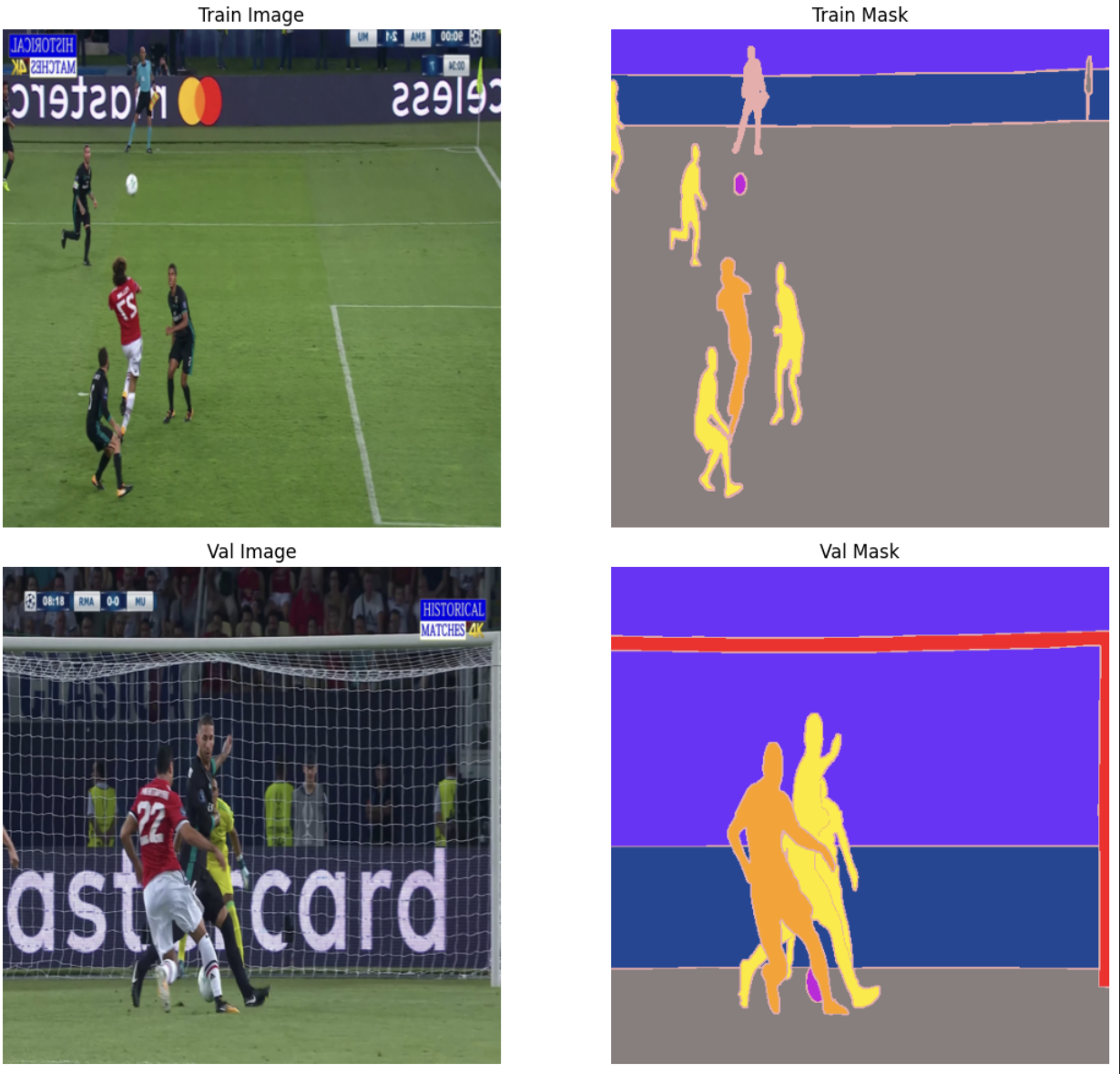
위 train image를 보면 반대로 뒤집어진걸 볼 수 있어, 증강처리도 잘 된 것을 확인할 수 있었다.
3-4. 손실함수 정의
○ Focal Loss
Focal Loss : 어려운 샘플에 더 집중하는 CE Loss의 개선 버전
CE Loss의 경우, 쉬운 샘플(배경)에 많은 가중치를 주기 떄문에, 어려운 클래스를 잘 배우지 못한다.(클래스 불균형이 심할 때)
-> Focal Loss의 경우 어려운 샘플(확률 낮은 샘플)에 가중치를 높여서 손실을 계산하여, 클래스 불균형에 강한 손실이다.
class FocalLoss(nn.Module):
    def __init__(self, gamma=2.0, alpha=None):
        super().__init__()
        self.gamma = gamma  # 어려운 샘플에 집중하는 정도
        self.alpha = alpha  # 클래스별 가중치 (None이면 균등)

    def forward(self, predict, target):
        # CE Loss 계산
        ce_loss = F.cross_entropy(predict, target, reduction='none')

        # 확률값 계산
        pt = torch.exp(-ce_loss)

        # Focal Loss 계산
        focal_loss = (1 - pt) ** self.gamma * ce_loss

        return focal_loss.mean()
현재 데이터셋의 경우, 배경(잔디)이 많고, 선수/심판/골대 같은 클래스는 적으니까 Focal Loss가 효과적으로 쓰일 거라고 판단했다.
○ Dice Loss
Dice Loss는 파이토치에 구현되어있지 않으므로 직접 구현하였다.
class DiceLoss(nn.Module):
    def __init__(self, num_classes = 11, smooth=1e-6):
        super(DiceLoss, self).__init__()
        self.smooth = smooth # 분모가 0이 되는것을 방지
        self.num_classes = num_classes # 클래스 개수

    def forward(self, predict, target):
        # 확률값으로 변환 (각 픽셀의 채널 합이 1)
        predict = torch.softmax(predict, dim=1) # [B, H, W, C]
        # 타겟 One-hot 변환 및 차원 정렬
        target = F.one_hot(target, num_classes=self.num_classes) # [B, H, W, C]
        target = target.permute(0, 3, 1, 2).float()              # [B, C, H, W]

        # 클래스별로 Dice 계산
        dice_per_class = []
        for c in range(self.num_classes):
            p = predict[:, c, ...].reshape(-1) # c번째 클래스 예측
            t = target[:, c, ...].reshape(-1)  # c번째 클래스 정답

            intersection = (p * t).sum()
            dice = (2. * intersection + self.smooth) / (p.sum() + t.sum() + self.smooth)
            dice_per_class.append(dice)

        # 클래스별 Dice 점수의 평균
        mean_dice = torch.stack(dice_per_class).mean()

        # Loss(1 - Dice) 반환
        return 1 - mean_dice
4. 모델링
Unet 기반으로 사용할 모델 :
- U-net 모델 직접 생성
- 커스텀한 Unet + backbone 교체(사전학습 X)
- 커스텀 Unet + backbone 교체(사전학습 O)
이 모델들을 실험하며 도출할 결론 :
backbone 유무 효과 비교
사전학습 유무 효과 비교
4-1. 블록 정의 : conv_block, upBlock
conv_block() : Conv -> BN -> ReLU -> Conv _> BN -> ReLU (컨볼루젼 연산 두번 진행하는 블록)
#두번 컨볼루젼 실행하는 Conv블럭 생성
class conv_block(nn.Module) :
  def __init__(self, in_channels, out_channels) :
    super().__init__()
    self.double_conv = nn.Sequential(
        nn.Conv2d(in_channels, out_channels, kernel_size=3, padding=1),
        nn.BatchNorm2d(out_channels),
        nn.ReLU(inplace=True),
        nn.Conv2d(out_channels, out_channels, kernel_size=3, padding=1),
        nn.BatchNorm2d(out_channels),
        nn.ReLU(inplace=True)
    )

  def forward(self, x):
      return self.double_conv(x)
업샘플링 + 스킵커넥션 + 채널축소 블럭이 반복적으로 나와서 class로 선언
#업샘플링 + 스킵커넥션 + 채널축소
class UpBlock(nn.Module):
    def __init__(self, in_channels, skip_channels, out_channels):
        super().__init__()
        self.up = nn.ConvTranspose2d(in_channels, out_channels, kernel_size=2, stride=2)
        self.conv = conv_block(out_channels + skip_channels, out_channels)

    def forward(self, x, skip):
        x = self.up(x)                        # 크기 2배
        x = torch.cat([x, skip], dim=1)       # skip connection
        x = self.conv(x)                      # 채널 정리
        return x
데이터의 수가 많지 않아서 bottleneck의 채널수는 512로 결정했다.
4-2. Custom U-net
class UNet(nn.Module):
  def __init__(self, num_classes=11):
    super(UNet, self).__init__()

    self.pool = nn.MaxPool2d(2)
    #encoder(channel 수 3 -> 1024), 한단계씩 내려갈떄마다 w, h // 2
    self.enc1 = conv_block(3, 64)
    self.enc2 = conv_block(64, 128)
    self.enc3 = conv_block(128, 256)
    self.enc4 = conv_block(256, 512)

    self.bottleneck = conv_block(512, 512)  #BottleNeck

    self.up1 = UpBlock(512, 512, 256)
    self.up2 = UpBlock(256, 256, 128)
    self.up3 = UpBlock(128, 128, 64)
    self.up4 = UpBlock(64, 64, 64)

    self.outc = nn.Conv2d(64, num_classes, kernel_size=1)

  def forward(self, x):
    x1 = self.enc1(x)
    x2 = self.enc2(self.pool(x1))
    x3 = self.enc3(self.pool(x2))
    x4 = self.enc4(self.pool(x3))
    x5 = self.bottleneck(self.pool(x4))

    x = self.up1(x5, x4)
    x = self.up2(x, x3)
    x = self.up3(x, x2)
    x = self.up4(x, x1)

    return self.outc(x)
4-3. Unet + ResNet34
ResNet34구조를 통째로 쓰면 중간 feature map을 저장하지 못하기 때문에, skip connection에 맞게 레이어를 분리하여 사용하였으며, weights인자를 사용해 2번째, 3번째 실험의 사전학습 여부를 조절할 수 있게 조정했다.
class UNetResNet34(nn.Module):
    def __init__(self, num_classes=11, weights=None):
        super(UNetResNet34, self).__init__()

        resnet = resnet34(weights=weights)

        # 인코더 (ResNet34 백본)
        self.enc1 = nn.Sequential(resnet.conv1, resnet.bn1, resnet.relu)  # (64, 256, 256)
        self.enc2 = nn.Sequential(resnet.maxpool, resnet.layer1)           # (64, 128, 128)
        self.enc3 = resnet.layer2                                           # (128, 64, 64)
        self.enc4 = resnet.layer3                                           # (256, 32, 32)
        self.bottleneck = resnet.layer4                                     # (512, 16, 16)

        # 디코더
        self.up1 = UpBlock(512, 256, 256)
        self.up2 = UpBlock(256, 128, 128)
        self.up3 = UpBlock(128, 64,  64)
        self.up4 = UpBlock(64,  64,  64)
        self.up5 = nn.Sequential(                        # skip 없는 마지막 업샘플
            nn.ConvTranspose2d(64, 32, kernel_size=2, stride=2),
            conv_block(32, 32)
        )

        self.outc = nn.Conv2d(32, num_classes, kernel_size=1)

    def forward(self, x):
        # 인코더
        x1 = self.enc1(x)         # (B, 64,  256, 256)
        x2 = self.enc2(x1)        # (B, 64,  128, 128)
        x3 = self.enc3(x2)        # (B, 128, 64,  64)
        x4 = self.enc4(x3)        # (B, 256, 32,  32)
        x5 = self.bottleneck(x4)  # (B, 512, 16,  16)

        # 디코더
        x = self.up1(x5, x4)      # (B, 256, 32,  32)
        x = self.up2(x,  x3)      # (B, 128, 64,  64)
        x = self.up3(x,  x2)      # (B, 64,  128, 128)
        x = self.up4(x,  x1)      # (B, 64,  256, 256)
        x = self.up5(x)           # (B, 32,  512, 512)

        return self.outc(x)        # (B, 11,  512, 512)
4-4. 모델 파라미터 수 비교
#파라미터 수 반환함수
def count_parameters(model):
    total_params = sum(p.numel() for p in model.parameters())
    return total_params
model_collection= {
'Custum U-Net' : UNet(),
'U-Net + ResNet34' : UNetResNet34(),
'U-Net + ResNet34(pretrained)' : UNetResNet34(weights = ResNet34_Weights.IMAGENET1K_V1)
}
df_data = []
for name, model in model_collection.items() :
params = count_parameters(model)
df_data.append({
'Model' : name,
'Total_params': f"{params:,}", # 천 단위 구분자
'Total_params_M': round(params / 1e6, 2) # 백만 단위
})
df = pd.DataFrame(df_data)
df

BackBone을 교체한 모델의 파라미터가 약 3배 정도 많은 파라미터를 보였는데, 학습시간에 얼마나 영향을 줄지 관찰해봐야겠다.